Which one would you rather maintain?
How much do you need to read to understand this control?
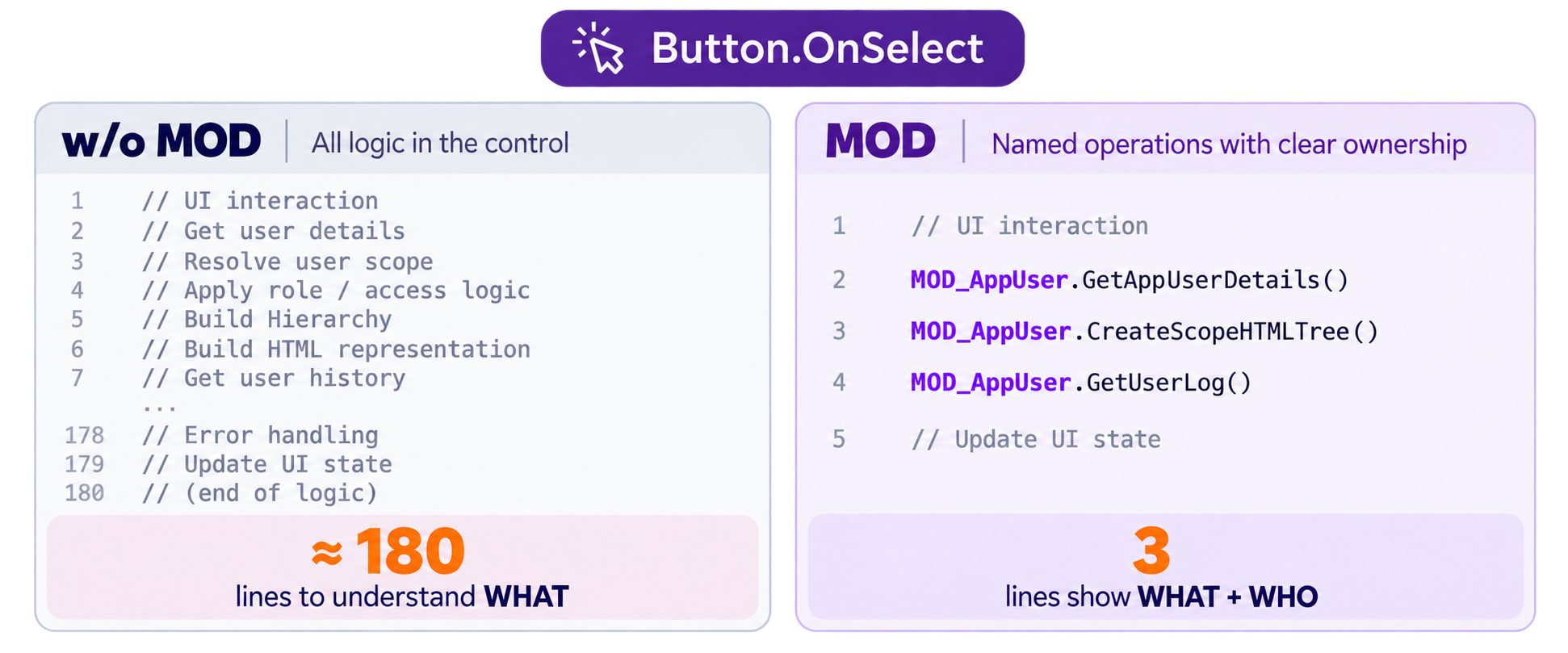
The code did not magically disappear. The responsibility moved.
You can use miles-long App.Formulas, hidden logic buttons or timer hacks. They can work.
But is it easy to read and understand? Three, six, nine months later, will you still know what is where, what depends on what, who owns what, and why?
Maybe there is another way?
So, WTF is a MOD?
Power Apps knows it as a Custom Component. MOD is a specific architectural role I give to some of them.
A MOD is a headless Custom Component that acts as a responsibility-focused module inside a Canvas App. It contains no UI, owns a defined responsibility, and exposes a small internal API through which the rest of the application interacts with that responsibility.
That is really the whole idea:
- Not a new Power Apps feature.
- Not a hidden object Microsoft forgot to document.
- Not some attempt to turn Canvas Apps into C#.
A Custom Component is simply the mechanism. MOD is the architectural role I give it.
For example:
- MOD_AppUser owns operations related to application users.
- MOD_Session owns the current session and effective access context.
- MOD_Org owns organization-related operations.
The UI can call them. Other responsibilities can call them when appropriate. But the logic does not need to live inside the screen just because the screen happens to trigger it. That distinction became increasingly important as the application grew.
I keep one canonical instance of each MOD on a dedicated Bootstrap screen. That screen acts as a simple composition root for the application: MODs are instantiated in one place, while the rest of the app interacts with those instances through their exposed operations.
I do not create another MOD_AppUser on every screen that needs App User logic.
The UI Became Smaller. The Responsibility Did Not.
Take this call: MOD_AppUser.CreateScopeHTMLTree(id, roleId)
From the UI, it looks tiny. The actual operation is not.
CreateScopeHTMLTree() has to understand the user's organizational scope, group that scope into a readable hierarchy, represent role depth correctly, handle special access cases, and finally produce the HTML used by the screen.
It also calls another operation responsible for resolving the user's scope:
Self.GetUserScope(id)
That operation is not specific to CreateScopeHTMLTree(). Other parts of the application use it too.
So no, MOD did not make that complexity disappear. It gave the complexity an owner.
And that, for me, is the important part:
- If something is wrong with how an App User scope is resolved, I know where to look.
- If the scope hierarchy needs to change, I know where that responsibility lives.
- If another screen needs the same App User representation, I do not have to reproduce the structural knowledge somewhere else.
I can follow the responsibility instead of searching the application.
That was the real shift. I was no longer asking: “Where can I put this formula?”
I started asking: “Who should own this responsibility?”
A MOD Is Not Where Long Formulas Go
A MOD is not where I move code because a formula became too long. Even a one-line operation may belong in a MOD.
Today it may be one line. Tomorrow it may be thirty. But that is not the point. Its responsibility did not suddenly change because its implementation grew.
If the operation belongs to MOD_Org, it belongs there whether its implementation takes one line or one hundred. Line count does not decide ownership.
Reuse matters too. If the same responsibility is needed in several places, I definitely do not want to duplicate it across the application. But reuse alone does not decide whether something belongs in a MOD. Responsibility does.
A pure calculation that takes input and returns an answer may fit perfectly well in App.Formulas. Something triggered once from one screen may still belong outside that screen if the responsibility itself does not belong to the UI.
For example, updating a Business Unit may only take a few lines.
MOD_Org.UpdateBusinessUnit(...)
is not a long operation. But the operation still owns the responsibility behind the update itself:
- Does the Business Unit exist?
- Is the current user allowed to update it?
- Did anything actually change?
- What needs to be logged?
- What gets persisted?
Short code. Real responsibility.
So the flow becomes something closer to:
UI
↓
User intent
↓
MOD_Org.UpdateBusinessUnit(...)
↓
Business rule + authorization + audit + persistence
The UI still has a job. A very important one. It handles what the user sees and how the user interacts with the application: panels, notifications, navigation, and the flow of the experience.
But:
The UI owns the interaction.
The MOD owns the responsibility behind the operation.
That boundary made my Canvas App much easier to reason about.
It Did Not Start This Cleanly
Here is the slightly embarrassing part. I did not sit down one morning and design “the MOD pattern.”
There was no architecture diagram. No grand framework. No list of principles. I was simply building a Canvas App that was getting bigger, and I wanted things to have a place.
Coming from other development experience, I kept looking at the app and thinking:
There has to be a clearer way to organize this.
So I started experimenting with Custom Components without UI. At first, the question was extremely primitive:
Can I make this work?
Then I discovered something that genuinely surprised me. I wanted to see whether the component could manage its own working data internally.
Collection operations such as ClearCollect(), Collect(), and Clear() were not offered by IntelliSense inside the component. I typed ClearCollect() anyway.
It worked.
And my first reaction was basically:
Well... FCK. Now this gets interesting
At that point I was not thinking about ownership, state lifecycle, architectural contracts or whether a Collection should exist there at all. I had simply discovered a capability.
And that is roughly how the whole thing evolved:
- Can I?
- Should I?
- Can I rely on this?
- Does this responsibility even belong here?
That last question changed much more than the first one.
When a Canvas App Stops Being Simple was about the questions that started this journey. MOD is where those questions began turning into structure.
Why Not Just Use App.Formulas?
Fair question. App.Formulas did not disappear just because MOD appeared.
I use App.Formulas for things that naturally belong there: calculations, transformations, reusable expressions, values that simply take something in and give me an answer back. I am not trying to replace App.Formulas.
The question for me became different:
Why should logic belonging to the App User responsibility become part of an application-wide formula container simply because that container exists?
Take GetAppUserDetails(). Its job is not simply to retrieve an Entra profile. It creates the representation of an App User that this application needs.
For an existing user, that means combining identity information with application-specific information such as role and status. For a new candidate, the same operation can produce the same App User shape with safe defaults before that person becomes an actual application user.
That knowledge belongs somewhere. I could put it in App.Formulas. I could call it from multiple places. It would work.
But reuse was no longer the question.
Who owns the knowledge of what an App User is inside this application?
For me, the answer became: MOD_AppUser.
That gives me a simple heuristic. Not a rule:
- If I only need an answer, App.Formulas may be enough.
- If something needs an owner and a lifecycle, I start asking whether it belongs to a MOD.
And sometimes the answer is still no. That is fine.
The goal is not to put everything into MODs. The goal is to make responsibility visible.
Something Unexpected Happened
Once responsibilities started getting owners, another benefit appeared. I spent less time deciding where new logic should go.
Suppose tomorrow the application gets a real requirement to move a Location from one Business Unit to another.
That sounds simple. Change the parent. Done?
Not necessarily.
- What happens to organizational scope?
- What happens to Departments below that Location?
- What happens to users whose authority depends on that structure?
- Does effective session access need to be recalculated?
- What needs to be logged?
If I need that operation, I already know where it begins:
MOD_Org.MoveLocation(...)
Not because MOD_Org magically knows how to solve the problem. Because the responsibility already has an owner.
But the change may not end there. Moving a Location may affect user scopes, effective session access, dependencies, and audit history. Those responsibilities already have owners too.
MOD_Org does not have to become the owner of everything affected by an organizational change. The MODs can work together without giving up their responsibilities.
That is one of the biggest practical changes MOD gave me:
- I spend less time deciding where a responsibility belongs.
- The structure starts answering design questions before implementation starts.
And for me, that is where separate MODs stop feeling like places to put logic and start behaving like parts of a system.
But MOD Did Not Solve Everything
Once you have a nice box called MOD_Something, it becomes very tempting to put things into it.
- A Collection? Sure.
- A variable? Why not.
- Some helper logic? Throw it in.
- Another operation that is vaguely related? Welcome aboard.
Congratulations. You can now build spaghetti inside beautifully named boxes.
MOD gave me structure. It did not give me discipline.
Having a place for a responsibility does not automatically mean the responsibility is well designed. Questions remained:
- Who is allowed to change this state?
- How long should it live?
- Does it need to be state at all?
- Is this really one responsibility?
- Am I duplicating knowledge that another MOD already owns?
- Does the UI know something it should not know?
- Did I create flexibility because the application needs it, or because I could?
The boxes were there. I still needed rules for what was allowed to live inside them.
That is where another part of this story started to emerge:
D.E.A.L.
Not because I sat down and decided that my architecture needed a cool acronym. It came from repeatedly running into the same design questions while building and restructuring the application.
MOD gave responsibilities a place to live. D.E.A.L. started disciplining how those responsibilities were allowed to live there.
But that deserves its own article.
Flexibility Does Not Mean Anarchy
Power Apps gives us flexibility. That is one of its strengths.
A Custom Component can have App Scope access enabled or disabled. With App Scope access enabled, a MOD can interact with application-level context. With it disabled, the component becomes a much stronger encapsulation boundary.
I don't think GLOBAL is automatically the answer. I don't think PRIVATE is automatically the answer either.
The more useful question is:
How much of the application does this responsibility actually need to see?
My original MOD approach was designed mostly around components with App Scope access enabled. But while experimenting with App Scope disabled, I found something worth exploring further.
A MOD does not necessarily need access to application scope at all.
Microsoft's component model supports component-instance scoped variables and Collections when App Scope access is disabled. Enhanced Component Properties also provide Actions that can perform behavior and modify state inside the component.
And that made me look at MOD again.
Some responsibilities may need application-level context. Others may be better encapsulated behind a much stricter boundary, receiving what they need through properties and exposing their operations through a small API.
Both can exist in the same application.
From the application side, they can still look consistent:
MOD_One.SomeAction(...)
MOD_Two.SomeAction(...)
The implementation behind that interface does not have to be the same.
In my current experiments, I even distinguish the component definitions:
MOD_One_GLOBAL
MOD_Two_PRIVATE
while their canonical instances on the Bootstrap screen remain simply:
MOD_One
MOD_Two
That naming is not a rule or a finished pattern. I am still exploring it.
But the architectural question behind it matters much more than the names:
Does this responsibility need App Scope access, or am I giving it access simply because I can?
There is also the Power Apps Studio oddity I mentioned earlier. Collection operations such as Collect(), ClearCollect(), and Clear() were not offered by IntelliSense inside the component, even though they worked when entered manually.
Microsoft's documentation makes the bigger picture clearer: component-scoped state and Actions that manipulate internal variables and Collections are part of the component model. The IntelliSense behavior is still curious, but the architectural capability itself is not just an accidental trick.
And yes, Microsoft, if someone from the Power Apps team happens to read this:
I would genuinely love some clarification on the IntelliSense behavior here.
If Collection operations are documented for use inside Custom Components, why are operations such as Collect(), ClearCollect(), and Clear() not exposed by IntelliSense?
The documentation says I can use them. They work when entered manually. But when the editor itself does not offer them, it still leaves a small gray zone around something that otherwise appears to be intentional.
And that brings me back to something much larger than App Scope.
Power Apps gives us flexibility. Whether that flexibility is good or bad is not really the question. The choice is ours.
But flexibility does not mean that everything should be allowed to live everywhere:
- It does not remove the need for ownership.
- It does not remove the need for boundaries.
- It definitely does not remove the need for structure.
Without those things, flexibility becomes anarchy.
Low-code does not mean careless code. And flexibility does not mean an uncontrolled application.
For me, systemizing a Canvas App is not about removing that flexibility.
It is about giving that flexibility a system to live in.
So... Can a Canvas App Be Systemized?
YES!!!
Not because MOD makes complexity disappear. Not because every formula should become a module. And definitely not because I found some secret feature hidden inside Power Apps.
MOD started much more simply. I wanted things to have a place.
Then the question changed.
From:
Where should I put this?
to:
Who owns this?
That change turned out to matter far more than where the formula itself lived.
A Custom Component gave me the mechanism. A headless component gave me the boundary.
MOD gave the responsibility a home.
And then I discovered that having homes was not enough.
They needed rules.
That is where D.E.A.L. begins.
In the next chapter.